Here's everything it does.
Built for the shop you run today... not the one you might run in ten years. $99 a month for the whole shop, up to 5 people.
Getting set up
A setup checklist
6 steps on Home, with your progress. Each step opens the page where you do it.
HVAC, ready on day one
Pick HVAC, and its equipment types, tune-up checklists, a maintenance plan and 16 starter services come in.
Your price list, your prices
The starter services come with empty prices. You fill in yours... we never suggest prices.
Your arrival windows
Set your own windows, like 8 - 11 AM. The customer's email shows the window.
Work days, closed days, time off
Mark the days the shop is closed and the days a technician is out.
Discounts
Set categories like Senior 10%. The invoice takes the discount off.
Emails in your shop's name
Every email to a customer carries your shop's name, and replies come to you.
The schedule
The day, one column per technician
Your arrival windows across the day, and every job in its place.
Jobs sized by the work
Each appointment takes the time its price list items need.
Changes show for everyone
Two people in the office see each change as it happens. No reload.
Cancel a visit
Cancel a visit or a whole job. The customer gets 1 email.
The week
Technicians down the side, days across the top.
Drag to move
Drag a job to another technician or another day. A new day or window sends the customer 1 email.
The "To schedule" drawer
Jobs that wait for a day sit in a drawer beside the calendar. Drag one in.
A suggested time
When you book a job, the app suggests an open day and time.
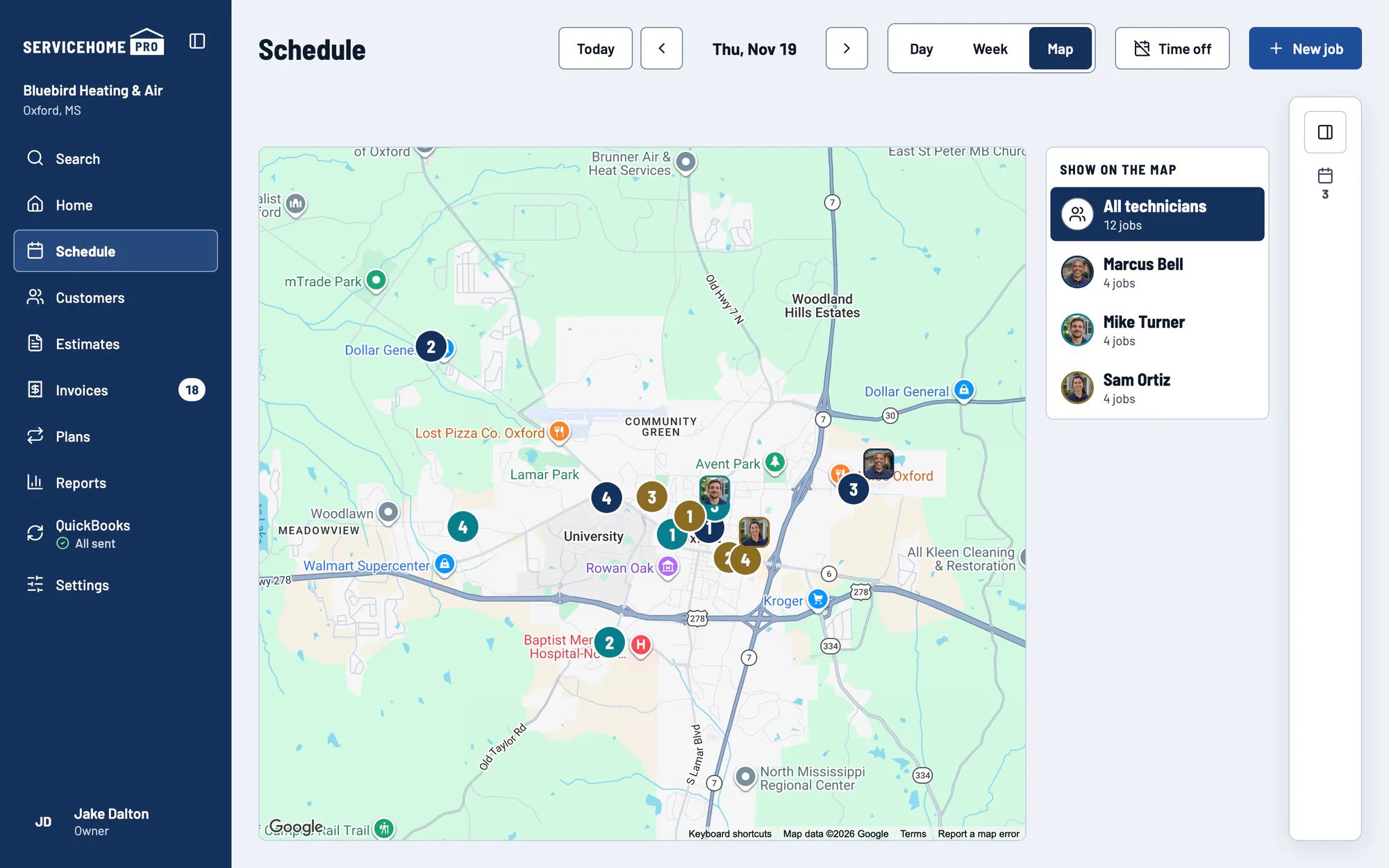
The office map, with faces
Every technician's stops on a map, and where each one is now, with their photo.
One technician's route
Pick a technician, and the office map draws their route for the day.
The technician's phone
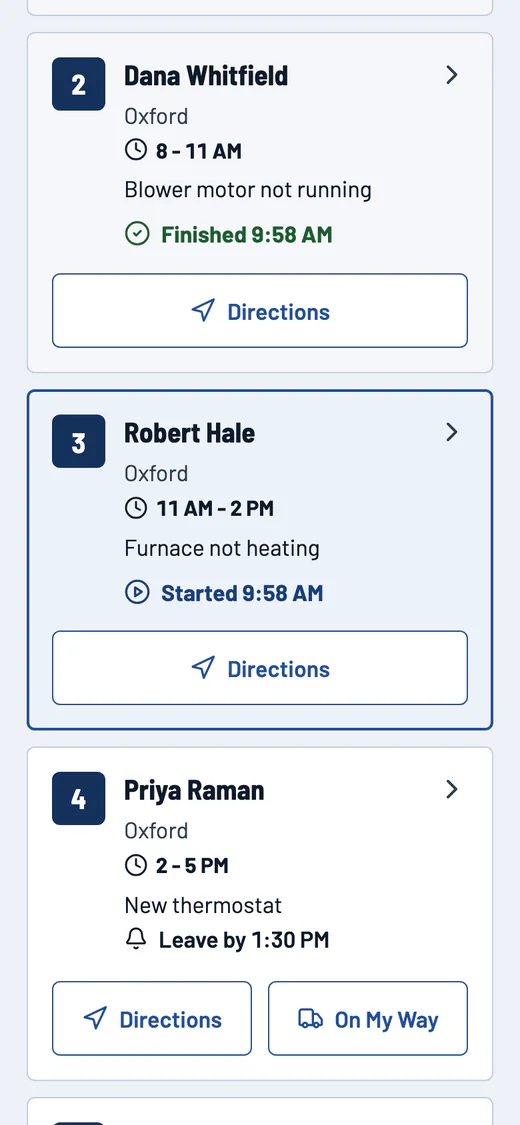
Today
The day's stops in order, each with On My Way and Directions.
Started and Finished
Each tap changes the job on the office calendar.
On the home screen
Add it to the phone's home screen like any other app.
On My Way, with a face
One tap emails the customer the technician's first name and photo. They know who's at the door.
Time to leave
A reminder when it's time to head to the next stop.
Reorder the stops
Swap stops inside a window. The office sees the new order.
The job on one screen
The customer, the notes, the equipment and the lines.
Checklists and readings
Each service has its own checklist. The readings go right on it.
Photos, notes and a signature
Take the photos, add the note, and get the customer's signature on the phone.
No signal? Keep working
Everything you type waits on the phone and goes to the office in order when the signal comes back.
Customers and their equipment
One customer, every address
Phones, email, notes and as many service addresses as they have.
A duplicate warning
Type a phone or email that's already in the app, and it tells you before you save.
One search box
Find any customer, address, phone or invoice number. On a laptop, press / and type.
The full history
Every job, estimate, invoice and plan for a customer, in one place.
Do not service
Mark a customer you won't go back to. Their plan ends and their last payment is settled.
Photos of the label
Take photos of a unit's label. They stay on the unit with its make, model and serial.
Age and warranty in plain words
Each unit tells you how old it is and where its warranty stands.
Estimates
Up to 3 options
Good, better, best... built from your price list.
The diagnostic fee, credited
Credit the diagnostic fee when the customer goes ahead with a big job.
An owner discount
Take a discount off one option.
One follow-up
No answer after your follow-up days? The customer gets 1 email. Not five.
Every estimate in one list
Open, approved and declined.
The customer picks and signs
Hand them the phone. They choose an option and sign.
A deposit and a financing link
Ask for a deposit, and add your financing link to a big job.
One tap to a job
Turn an approved estimate into a job, or tap "Add to this job".
Invoices and getting paid
The invoice builds itself
From the job: the lines, the discount, any deposit, the tax and the total.
Pay by link
Email the invoice. The customer pays by card or bank transfer at Stripe's standard rate.
Checks
Record a check in the office, with 2 minutes to undo.
Overdue reminders
The app emails the customer about an overdue invoice, so you don't have to.
Every invoice in one list
Unpaid, paid and overdue. Each payment shows where it stands, up to the day Stripe pays you.
Show payment code
The customer scans it and pays on their own phone, right there in the driveway.
Refunds
Refund a card, bank or check payment.
Maintenance plans
Your plans
Set the visits, the seasons, the price and the billing.
Sell a plan on the spot
For an address and its equipment, with the customer's card saved with their consent.
Renewals
A reminder email 30 days before a plan renews. Then it renews by itself on the saved card.
End or refund a plan
When a customer moves or quits, close it out clean.
Plan visits schedule themselves
The app places each visit in an open arrival window and leaves room for repairs.
The ones that need you
See which visits found a place and which need a person.
Cards charged on schedule
A declined card is retried, and the office gets told.
The homeowner knows the day
Each plan visit gets an email with the day and the window.
What your customer sees
Your page, no password
The customer opens your page from an email link. It shows your logo, your name and your phone.
Approve and pay a deposit
They choose an option and pay the deposit from that page.
A card on file
They save or replace their card themselves.
Old link? New link
A link older than 30 days offers "Send me a new link".
My Home
Each unit with its age and warranty, the plan and the next visit.
A booking page
Customers ask for a visit on your own booking page. It lands in your To schedule drawer under Requested online, with their phone, so you can call and book it.
Keep the time or pick another
The customer keeps the visit time you set, or picks another one.
QuickBooks
Connect your QuickBooks
Connect from Settings. The app matches the customers you already have there.
Typed once, sent once
Customers, price list items, invoices, payments and refunds go to QuickBooks once each, in order.
Voids too
Void an invoice here, and it's void in QuickBooks.
One-button fixes
If QuickBooks says no, the app tells you why and gives you 1 button to fix it.
A morning check
Every morning the app checks that your customers and price list items still match QuickBooks.
Hand changes
Someone changed a record in QuickBooks? Keep the app's version or take theirs.
Your team, your data, your account
Up to 5 people, each with a role
A technician sees the work, not the money. Billing and the team stay with you.
A second sign-in step
Turn on a code from an authenticator app.
Your records are yours
Each shop's records are walled off from every other shop, and a test proves it on every change.
Export all data
Download everything, any time. One file per area.
One price
$99 a month for the shop. 30 days free first. No card to start.
Cancel any time, from Settings
No phone call. If you stop paying, you can still see and export everything.
When you leave, we delete
We delete a shop's data 90 days after it ends.